
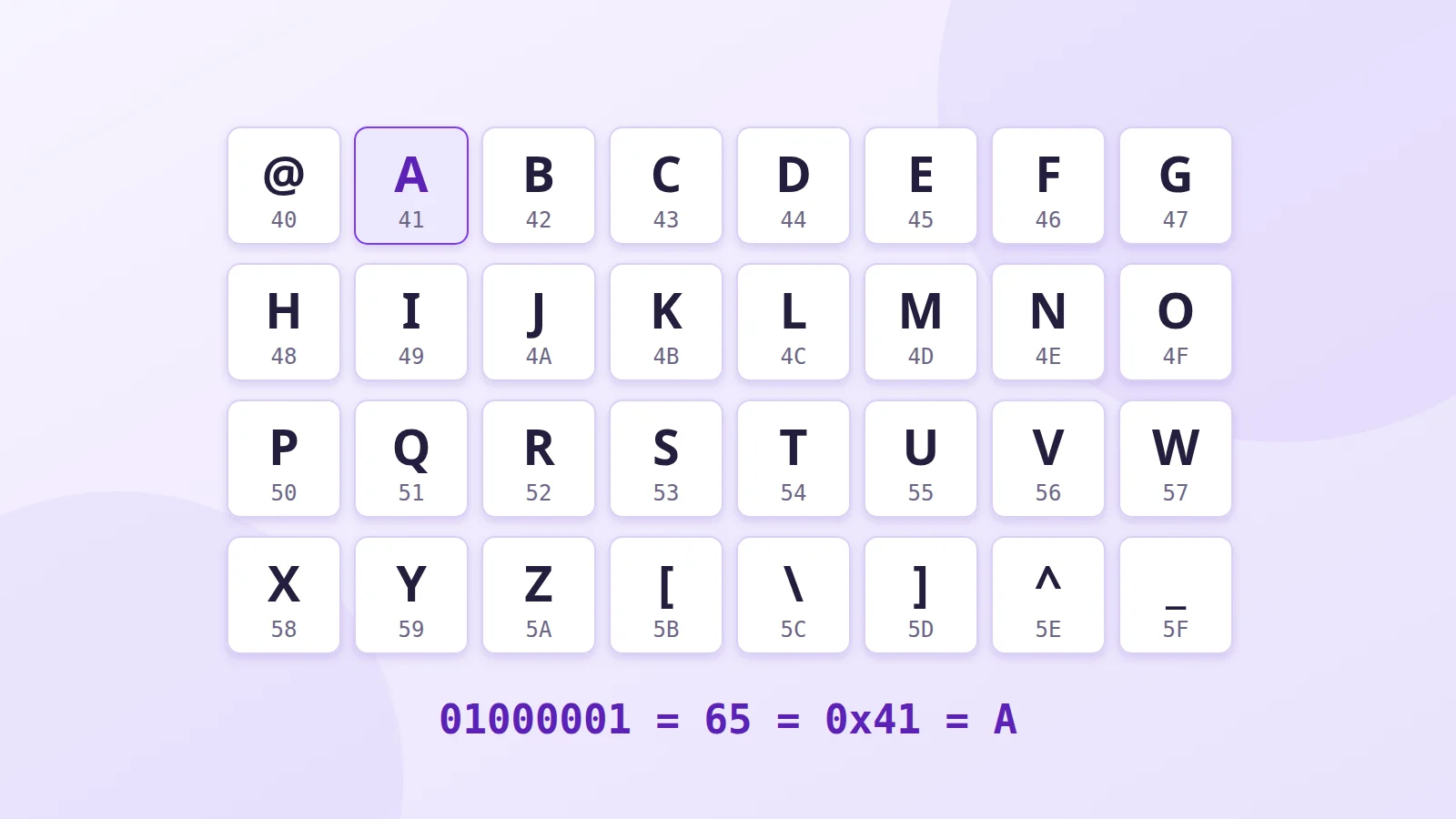
A computer only understands numbers. To display the letter A, it needs a table that says "number 65 is A". That table is a character encoding. The oldest one still in use everywhere is called ASCII; its successor, Unicode, is what lets you read Arabic, Russian and emoji on the same page today.
Before ASCII: the telegraph
Nineteenth-century Morse code already represented letters as signals, but it was designed for an operator's ear, not for a machine: each letter had a different length.
Early 20th-century teleprinters adopted a 5-bit code, derived from the one invented by the Frenchman Émile Baudot and standardised as ITA2. Five bits only give 32 combinations, not enough for letters and digits. So a special character switched between "letters" and "figures" mode, and a single transmission error could turn a whole message into numbers.
The birth of ASCII (1963-1967)
In the early 1960s, every computer maker had its own encoding, and machines couldn't exchange text. The American Standards Association brought together a committee, including IBM and AT&T, to define a common code: the American Standard Code for Information Interchange, or ASCII.
The committee chose 7 bits, giving 128 characters. The first version, in 1963, didn't even include lower-case letters; they arrived with the 1967 revision, which then spread everywhere.
What's in the ASCII table
- 0 to 31 and 127: control characters. They aren't displayed; they were used to drive teleprinters. Several are still in use: tab (9), line feed (10), carriage return (13), Escape (27).
- 32: space.
- 48 to 57: the digits 0 to 9.
- 65 to 90: capitals A to Z, and 97 to 122: lower case a to z.
- The rest: punctuation and symbols such as @, #, $ and {.
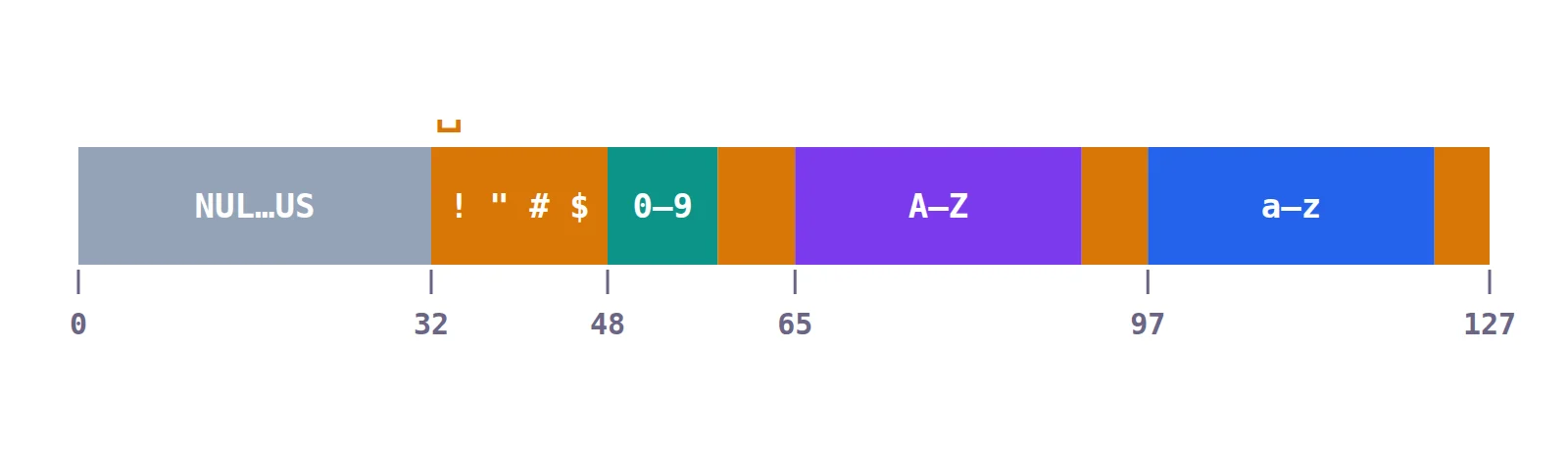
The order isn't random. Letters follow alphabetical order, which makes sorting easy, and an upper-case letter and its lower-case version are always 32 apart, which makes converting between them trivial for a program.
The trouble with accents
128 characters are enough for English, but not for the rest of the world. ASCII has no é, ñ or ü, and no Arabic, Russian or Chinese letters.
Since a byte has 8 bits, the spare bit was used to add 128 more characters. But every region filled them in its own way: these are "code pages". ISO-8859-1 and Windows-1252 for Western Europe, ISO-8859-5 for Cyrillic, Windows-1256 for Arabic, Shift-JIS for Japanese…
So the same byte could mean é in France and a Cyrillic letter in Russia. Read with the wrong code page, a text became unreadable: this is "mojibake". Many people remember seeing "é" instead of "é" in emails. And you couldn't mix French, Russian and Arabic in the same document.
Unicode: one number for every character
Unicode, first published in 1991, solves the problem at the root: every character in every script gets a unique number, its code point, whatever the country or software.
- U+0041: A
- U+00E9: é
- U+0627: ا (Arabic alif)
- U+042F: Я (Cyrillic ya)
- U+1F600: 😀
Unicode now has more than 150,000 characters: every modern script, many historical ones, mathematical symbols and emoji. Its first 128 code points are exactly ASCII.
UTF-8: how they're stored
Unicode assigns numbers; they still need to be stored as bytes. The most widespread encoding is UTF-8, designed in 1992 by Ken Thompson and Rob Pike:
- ASCII characters take 1 byte, exactly as before, so an ASCII file is also a valid UTF-8 file;
- accented letters, Arabic, Greek, Cyrillic and Hebrew take 2;
- most Chinese, Japanese and Korean characters take 3;
- emoji take 4.
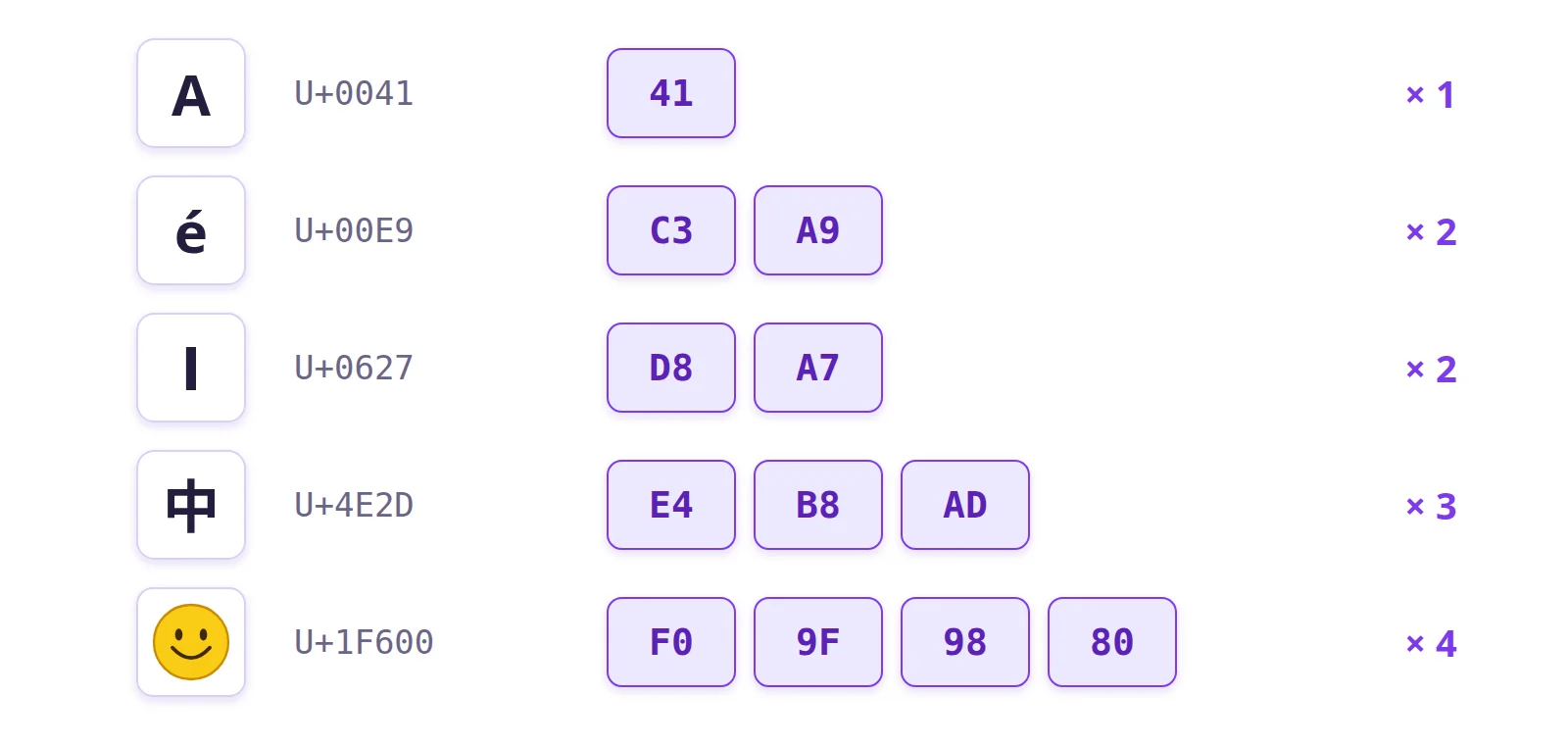
That compatibility with ASCII explains its success: today more than 98% of websites use UTF-8. If text still shows "é", it's almost always because a program read UTF-8 as if it were Windows-1252.
Where you still meet ASCII
- Source code: keywords, variable names and operators are almost always ASCII.
- Web and email protocols (HTTP, SMTP) exchange their commands as ASCII text.
- The terminal, where colours are still controlled by sequences that start with the Escape character.
- Emoticons like :-) and ASCII art, born when those 95 printable characters were all you had.
Further reading
- Accents and special letters: how to type them
- The history of emoji
- Typing Chinese: Pinyin and Wubi
- Full ASCII table
- The Unicode Consortium
- The history of UTF-8, by Rob Pike